Architecture
How Unveily connects your web app to native features
Overall Structure
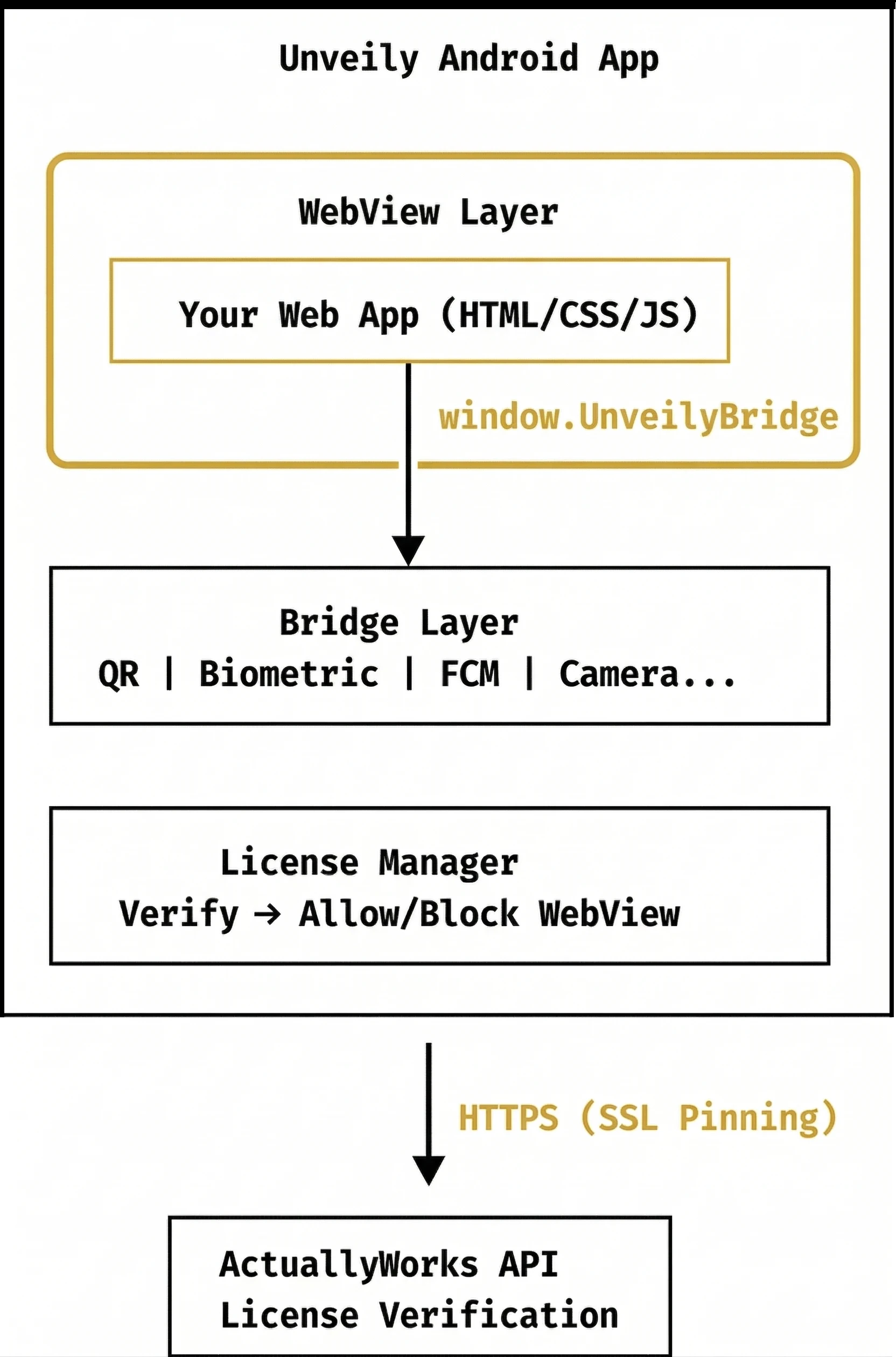
Components
WebView Layer
- Based on the Android
WebViewand iOSWKWebViewcomponents - Only allows the
TRUSTED_WEB_URL(UnveilyInitialURLon iOS) domain (security isolation) - Communicates with the Bridge via JavaScript Interface
Bridge Layer
The web ↔ native communication interface. Exposed as the global object window.unveilyBridge, and once injection completes the unveilyGlueReady event fires. Read the active modules/plan with unveilyBridge.app.getInfo() (tier & features) and unveilyBridge.modules.isEnabled(name). Features per plan:
Basic:    QR·Camera·Location | Storage (TEMP/PERM/SECURE) | Offline cache | Push (FCM)
          | Accessibility panel + TTS/STT/Haptic | bottomTabs · topDownMenu | Google·Apple login
Standard: Basic + Biometric auth · sideDrawer · Kakao/Naver/LINE login
Pro:      Standard + In-app purchases (IAP) · Meta login
Per-platform native implementation mapping:
| Feature | Android | iOS |
|---|---|---|
| SECURE storage | AndroidKeyStore | iOS Keychain |
| Biometric auth | BiometricPrompt | Face ID / Touch ID |
| In-app purchases | Google Play Billing | StoreKit 2 |
License Manager
Validates the license when the app starts:
- Reads the local file (
license.key) and validates the HMAC signature - Verifies online with the server (checks expiry date and activation status)
- Allows the WebView to run if validation succeeds
SSL Pinning
SslPinningManager verifies the API server certificate pin (SHA-256).
This protects license communication from man-in-the-middle (MITM) attacks.
Flavor Structure (Android)
On Android, Unveily uses 3 Product Flavors:
| Flavor | applicationId suffix | Included features |
|---|---|---|
basic | .basic | All basic features |
standard | .standard | Basic + Biometric auth |
pro | .pro | Standard + In-app purchases |
Each Flavor is built as an independent APK/AAB. iOS ships the same plans as separate targets/schemes (Basic/Standard/Pro).